

File Waster 6.7.2
File Waster prevents unauthorized access to data stored on your hard disk
Program info
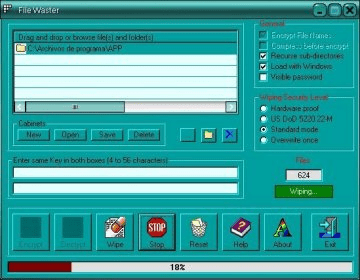
File Waster can avoid that your most important documents fall into the wrong hands, it is a security tool that allows you to encrypt files (coded with some of the strongest encryption algorithms available today), and delete files safely. Encrypting a file is a task as easy as dragging the files to encrypt to the program interface and insert a key with a length between 4 and 56 characters.
File Waster clears the original files making them unrecoverable, preventing them to be recovered through any recovering application. It also allows you to encrypt the file name, so no one can imagine its content.
This tool works with both individual files and entire directories including their subdirectories. Another File Waster interesting feature is the opportunity to save disk space by compressing files before they are encrypted. Moreover, it has four different modes for safe disposal. One of them, at the hardware level.
How to use File Waster:
To start, you must keep clearly in mind what folders do you want to encrypt.
After you install and run the application, browse your hard disk and drag the above mentioned files and folders to the application window, or you click on the icon " ... " (Browse for file, search for files) or the folder image icon (Browse for folder, look for a folder). Enter the same password in both text boxes under the list of files, and press the button [Encrypt], which shows a red string. Then, a progress bar will show the progress of the action. If you want to cancel it, press the [Stop] button. More
Pros
- Fast
- Strong encryption
- Multilanguage
- And Free!
Cons
- You must decrypt the file before working with it
Details
Extensions

No information available
The data will be available later.Awards

Related software

Delete Currently Used, Locked, Undeletable, Busy Files.

Protect files with a personal password.

Actual File Folders speeds up the navigation through file folders.
Related stories
See all
The Windows 10 Extended Security Updates program has already gone through some transformations, although it hasn't yet started. Here's what to know.

Gen Alpha grew up with apps, search, and cloud storage—not folders. Here’s why files feel invisible and why basic computer skills still matter.

Claude can now leave an invisible watermark in AI-assisted text. Here’s what it proves, what it doesn’t, and why authorship is getting harder to define.


Comments